 OpenMyDrawing
Help
Short how-tos, each with a picture. They work the same on a phone and a computer.
Open a drawing from WhatsApp or email
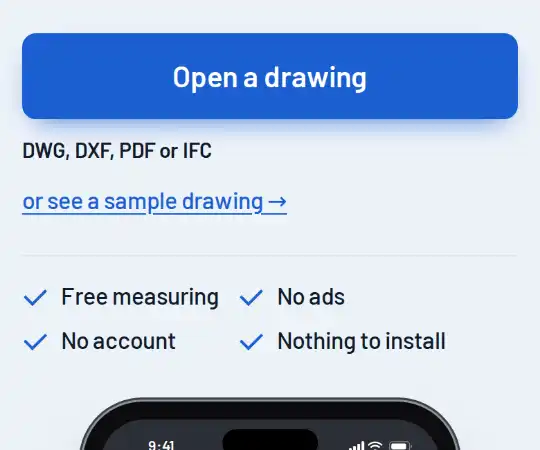
- Save the file to your phone first. On an iPhone, tap the file, tap Share, then Save to Files. On Android, tap the file, or the download arrow in Gmail.
- Go to the front page and tap Open a drawing. The button at the bottom of this page takes you there.
- Pick the file. A PDF, DWG, DXF or IFC file opens in the right viewer by itself.
On Android, from WhatsApp
- In the chat, tap the drawing once so it downloads.
- In Chrome, go to the front page and tap Open a drawing. If the phone asks how to open it, choose Files (Browse on some phones).
- Look under Recent first: a file you just downloaded is at the top.
- Not there? Open the menu at the top left and choose the phone's storage, then Android, media, com.whatsapp, WhatsApp, Media and WhatsApp Documents. On phones older than Android 11 it is WhatsApp, Media, WhatsApp Documents.
- Tap the drawing. A DWG, DXF, PDF or IFC file opens in the right viewer by itself. So does a copy named like “plan.dwg (1)” or “plan.pdf-1”, and a file whose name has no extension.
On a computer, save the attachment, then drag it onto the page.
Measure a length
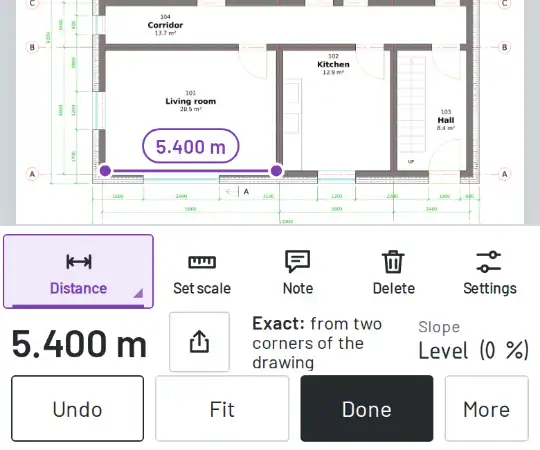
- Press Measure, then choose Distance.
- Tap one end, then the other. The length shows on the line and in the bar at the bottom.
- To aim exactly, hold your finger on the drawing. A cross and a magnifier show the point above it; lift your finger to place it.
- Tap more points for a chain: each part's length shows on its line, with the total. Press Done to finish. Undo takes back the last point.
With Snap to points (snap) on (under More), a point near a line end, corner, middle, crossing or circle centre snaps to it.
Set the scale
- A DWG or DXF usually stores its units. Then the bar says Scale from drawing, and you can measure at once.
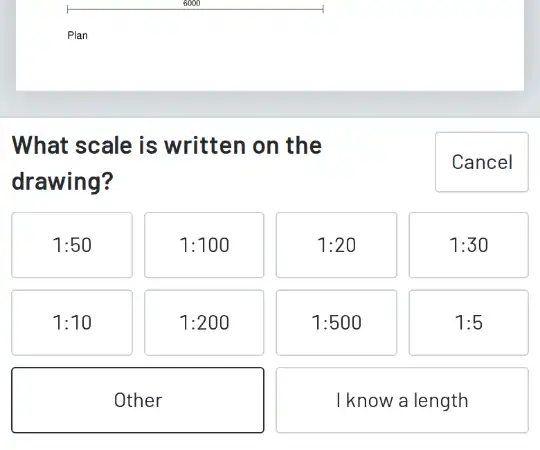
- A PDF may have no scale. Then Measure asks: What scale is written on the drawing? Tap the scale from the title block, for example 1:100.
- Not sure of the scale? Tap I know a length. Tap both ends of a dimension written on the drawing, type its length and tap Use this length.
- To change the scale later, press More, then Set scale.
To be sure, measure one dimension written on the drawing and compare.
Area: by its corners, or Auto area with one tap
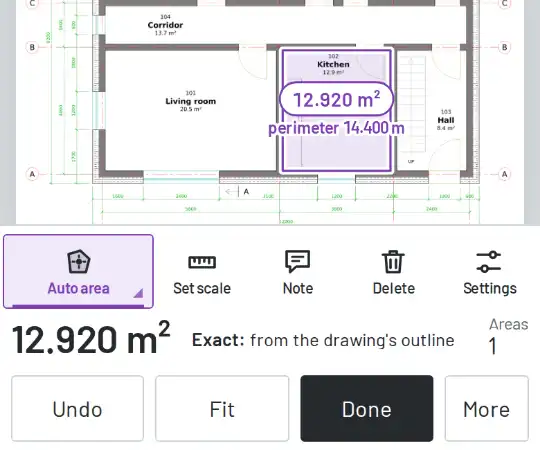
Area, by its corners:
- Press Measure, then choose Area.
- Tap each corner of the area, three or more. Then tap the first corner again, or press Done.
Auto area, with one tap:
- Press Measure, then choose Auto area.
- Tap inside a room. If its outline is closed on the drawing, the area and the perimeter show at once.
- Tap more rooms. The big number in the bar is then their total, and Areas says how many there are.
- If it says No closed outline here, tap each corner instead, then the first corner again.
On a phone, the first button in the row shows the tool in use. Tap it to choose another.
IFC models: the basics
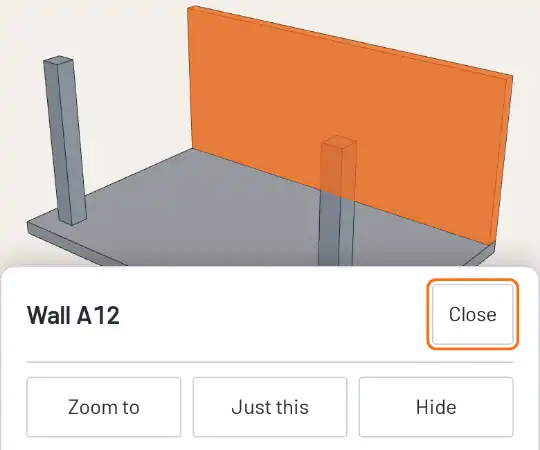
- Open the IFC file like any drawing. It opens in your browser and never leaves your device.
- Turn the model with one finger. Pinch to zoom, and drag with two fingers to move it. With a mouse: drag to turn, right-drag to move, wheel to zoom.
- Tap a part to see what it is: its name, type, floor and material.
- View looks from the top, the front or the side. Elements finds a part, or shows one floor only.
- Section cuts through the model. Measure gives the distance between two points.
- A model you have opened stays on your phone and opens again quickly, without the file. The page still needs an internet connection. It is under “Kept on this phone”, with its size and Delete.
Which DWG files open
These DWG formats open. We have tried each of them with test files:
R2.6, R9, R10, R11 and R12, R13, R14, 2000, 2004, 2007, 2010, 2013 and 2018.
Files in the R1.4 and R2.10 formats do not open. We have not tested formats that are not listed here.
If a file does not open, the page says why. Then ask the sender for a PDF of the drawing.
Share a drawing with the app
- In WhatsApp, Gmail or Files, find the drawing.
- In WhatsApp, touch and hold the file; in other apps, open it. Tap Share, then OpenMyDrawing.
- Tap “Open the shared file” with the file's name. The drawing opens in the viewer.
A DWG, DXF or PDF file can be shared. A 3D model cannot: open it with Open a drawing.
If the app asks you to share the file again, share it again. The first share after installing can arrive before the app is ready. If OpenMyDrawing is not in the Share list for a DWG, the phone does not know the file's type. Open it with Open a drawing.
The Preview mark
DWG and DXF drawings show a light “Preview” mark in this app, a few times across the sheet and also when you zoom in. It does not change sizes, scale or measurements: measuring works the same. PDF pages and the sample drawing never carry it.